2. What is Texture?
- Definition: Texture is easy to recognize visually but difficult to define precisely. It generally refers to:
- Views of a large number of small objects (e.g., grass, foliage, pebbles).
- Surfaces exhibiting patterns (e.g., spots, stripes, wood grain, skin).
- Key Characteristics: Texture consists of organized patterns of regular sub-elements.
- Scale Dependence: Whether a visual pattern is considered “texture” depends on the scale at which it’s viewed. A single leaf is not texture, but a field of leaves is.
3. Texture-Related Problems
Several computer vision tasks involve texture:
- Texture Analysis: Representing and modeling texture. The goal is to find a mathematical description of a texture.
- Texture Segmentation: Dividing an image into regions where the texture is consistent. This is like object segmentation, but based on texture instead of, say, color.
- Texture Synthesis: Generating large areas of texture from small example patches. Think of this like “texture cloning.”
- Shape from Texture: Inferring the 3D shape or orientation of a surface from the texture in the image. Texture gradients (changes in texture) provide cues about surface orientation.
4. Representing Texture: Textons
- The Goal: To represent texture, we look for the regular sub-elements that compose it. These sub-elements are sometimes called “textons.”
- Approach:
- Find the sub-elements: Identify the repeating patterns.
- Represent their statistics: Describe the characteristics of the sub-elements (e.g., size, shape, orientation).
- Reason about their spatial layout: How are the sub-elements arranged relative to each other?
- Challenge: There is no universally agreed-upon, definitive set of textons.
5. Texture Analysis Approaches
Several approaches are used for texture analysis:
- Co-occurrence Matrices (Classical): A statistical method based on the spatial relationships between pixel intensities.
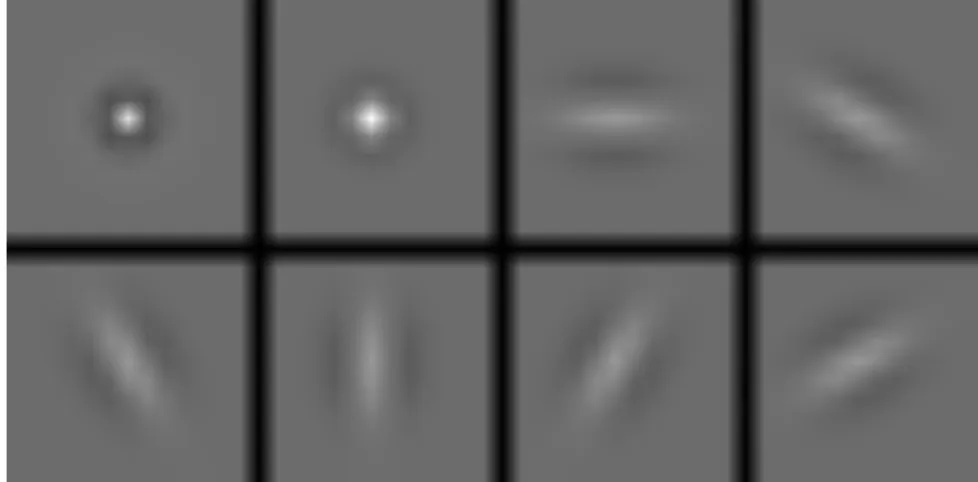
- Spatial Filtering: Applying filters (like edge detectors or Gabor filters) to extract texture features.
- Random Field Models: Statistical models that describe the probability of pixel values given their neighbors. (Not covered in detail in these slides).
6. Co-occurrence Matrix Features
-
Objective: To capture the spatial relationships between pixel intensities in a texture.
-
Co-occurrence Matrix (C): A 2D array where:
- Rows and columns represent the possible image intensity values.
- counts how many times intensity value i occurs next to intensity value j with a specific spatial relationship d.
- The spatial relationship d is defined by a vector , representing the offset in rows (dr) and columns (dc) between the two pixels.
Example:
Consider a small grayscale image and a displacement vector :
1 1 0 0
1 1 0 0
0 0 2 2
0 0 2 2
0 0 2 2
0 0 2 2
The co-occurrence matrix would be:
   0 1 2
0 [1 0 3]
1 [2 0 2]
2 [0 0 1]
-
Normalized Co-occurrence Matrix (): Each entry in divided by sum of entire matrix. This makes co-occurrence statistics less sensitive to number of pixels.
-
Quantitative Features from Co-occurrence Matrices:
- Energy: (Measures uniformity. Higher for homogeneous textures.)
- Entropy: (Measures disorder. Higher for more random textures.)
- Contrast: (Measures local variations. Higher for textures with large intensity differences.)
- Homogeneity: (Measures similarity. Higher for textures with similar pixel values.)
- Correlation: (Measures linear dependencies. , are means, and , are standard deviations of rows and columns.)
-
Disadvantages of Co-occurrence Matrices:
- Computationally expensive, especially for large images and many intensity levels.
- Sensitive to grayscale distortion (since they directly depend on pixel values).
- More suitable for fine-grained textures than for textures with large-scale structures.
7. Spatial Filtering Approaches
- Core Idea: Apply filters to the image to detect the “sub-elements” of the texture.
- Filter Responses: The magnitude of the filter response indicates the presence of a particular texture element.
- Common Filter Types:
- “Spot” filters: Gaussians or weighted sums of concentric Gaussians. These detect blob-like features.
- “Bar” filters: Differencing oriented Gaussians. These detect edges or lines at specific orientations.
Example Filters (visual representation):